
To edit, or not to edit.
That is the question.
Product photography is challenging for a lot of online craft sellers no matter what platform you’re selling on because your photos are the first thing a customer sees and will need to decide whether to click on your listing or keep browsing.
The secret to great product photos is to first start out with a quality photo
This means you’ve got the 2 basics of product photography down which is understanding how to properly light your product and having a non-distracting background.
Once you’ve photographed your products, the last step is to edit them before you upload them to your product listings.
But you might be thinking …
“My product photos look fine as they are without any editing.”
Or
“If I edit them, it will throw off the colors or mislead customers about how my product looks.”
Or
“It’s too hard to edit my product photos. It intimidates me!”
Don’t worry! I’ll show you why it’s important to edit them, what a difference it can make in how your photos look and editing your product photos isn’t as scary as you think it is.
Want to learn more of the basics to getting a great product photos? Click here to learn how to achieve consistency in your photography
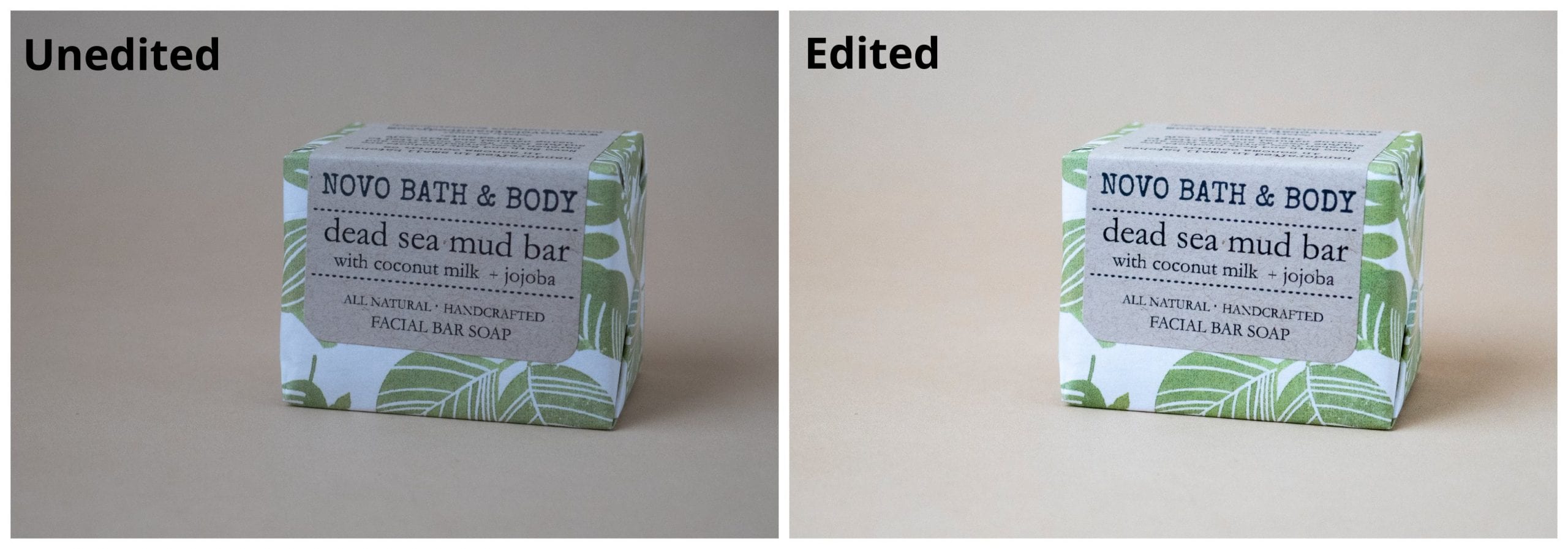
Editing your product photos is a must when selling online
I tell my coaching clients it’s essential to edit their product photos, especially when they’re selling handmade products online.
Why?
- It’s going to make your products look a lot better.
- It’s going to make your business look more serious and professional.
- Because customers rely heavily on your photos to determine whether they’re going to purchase from you.
You want your products to stand out when selling online
Editing your product photos should be done to enhance the way your product looks and to help portray your product in a way that is as close as possible to the way it looks person. We’re not looking to do heavy editing, learn the ins and outs of Photoshop, figure out how to do layers, etc. If you want to do that, then I’d recommend finding some courses or Youtube tutorials to do this.
But if you’re just looking to understand the basics of what editing you may need to do, keep reading.
Not sure what each of the settings mean in your photo editing software?
Here are some common settings you’ll find and what each one does to your photo.
Crop/Adjust - Are your horizons lopsided? Is there too much space around your product? This is where you make these corrections. Fixing horizons is important because it can throw off the balance and look of your product. Cropping can help too with the overall composition of your photo, so don’t be afraid to do a little cropping if needed.
Exposure/Brightness - Photo looking gray or dark? Most product photos would greatly benefit from bumping up the exposure or brightness. Increase the brightness and see how much better your product photo looks.
Contrast - If your product photo is looking a bit flat or dull, increasing the contrast will help make the light and dark areas more pronounced.
Highlights - Do the brighter areas seem a little dull? Adjust the highlights to brighten these up.
Shadows - Do the shadow areas of your photo look too dark or too light? Adjust the shadows to make sure your shadows don’t look flat or overly dark.
Vibrance - Adjust the vibrance to increase the intensity of the muted colors in your photo.
Saturation - Increase or decrease the intensity of colors in your photo.
Texture - Bring out the texture of surfaces or soften them with this setting.
Temperature/White Balance - Sometimes your photo might come out a little yellow, blue, red, etc. This is the time to correct the color cast, especially if you didn’t make this adjustment before you took photos. Color accuracy is important!
Remember, you may not need to adjust ALL of these settings.
I’d minimally adjust the white balance, increase the brightness and possibly increase the contrast. Everything else to me is as needed.
Regarding editing software, I primarily use Adobe Photoshop or Lightroom to edit my product photos on my computer. However, if I’m using my phone to edit my photos, I’ll use Snapseed which is free on both Android and iOS. There are lots of free and paid photo editing software available for your computer or your phone.
So there’s your quick run-through into how to edit your product photos of your handmade products.
What are your thoughts about editing your product photos? Do you like it? Dread it? Avoid it all together? Let me know in the comments below!